
Product
See progress. Prove what was built.
SpatialSense puts % complete on your floor plan, zone by zone, and keeps a timestamped photo record of every capture. Rebar, conduits and services are on record before a pour or a ceiling covers them, so progress is not argued and nothing is opened up to prove it. AI drafts the report for your team to review.
Where projects lose time and money.
Four problems, one cause. There is no dated, located record of what was built that every party trusts.
The percentage is argued
Progress comes from a monthly report that arrives late and is open to interpretation. Nobody sees which zone is slipping until it has slipped.
Claims run on memory
Extensions of time, variations and back-charges turn on what was on site and when. Photos with no reliable date or place are hard to rely on.
Once covered, it is gone
After a pour or a ceiling close-up, nobody can show what is inside. The options are coring, breaking out or opening up, then rework, delay and a fight over who pays.
Nobody can be everywhere
Engineers, consultants and clients walk the site just to confirm status, and still leave without a record that anyone else can check.
See
Progress on the plan, zone by zone.
Every walk is placed on the floor plan, and SpatialSense AI reads each zone's progress from the capture. The plan moves from red to green as work advances, with the level total set against the contractor programme. A zone that slips shows after the next walk, not in next month's report.
- % complete for every zone, and by trade: structure, MEP rough-in and finishes.
- Step between any two visits to see what moved and what did not.
- The level against the programme, so an on-time level cannot hide a late zone.
- Every zone opens the dated 360 captures behind its number.
Illustrative floor plan. Progress scores are indicative visual assessments, not payment certifications.
Prove
Before it is covered, it is on record.
Rebar and embedded conduits before a pour. Services above the ceiling before close-up. Each capture carries its date, time and position on the plan, and links to the inspection request that approved the works. What was inside becomes a record, not a recollection.
- Date, time, location and capture ID on every photo.
- Linked to the RISC (inspection request) that approved the works.
- For the works nobody can see later, such as pours, MEP in ceilings and walls, waterproofing and buried services.
- Open the record when a claim, variation or back-charge asks what was there.
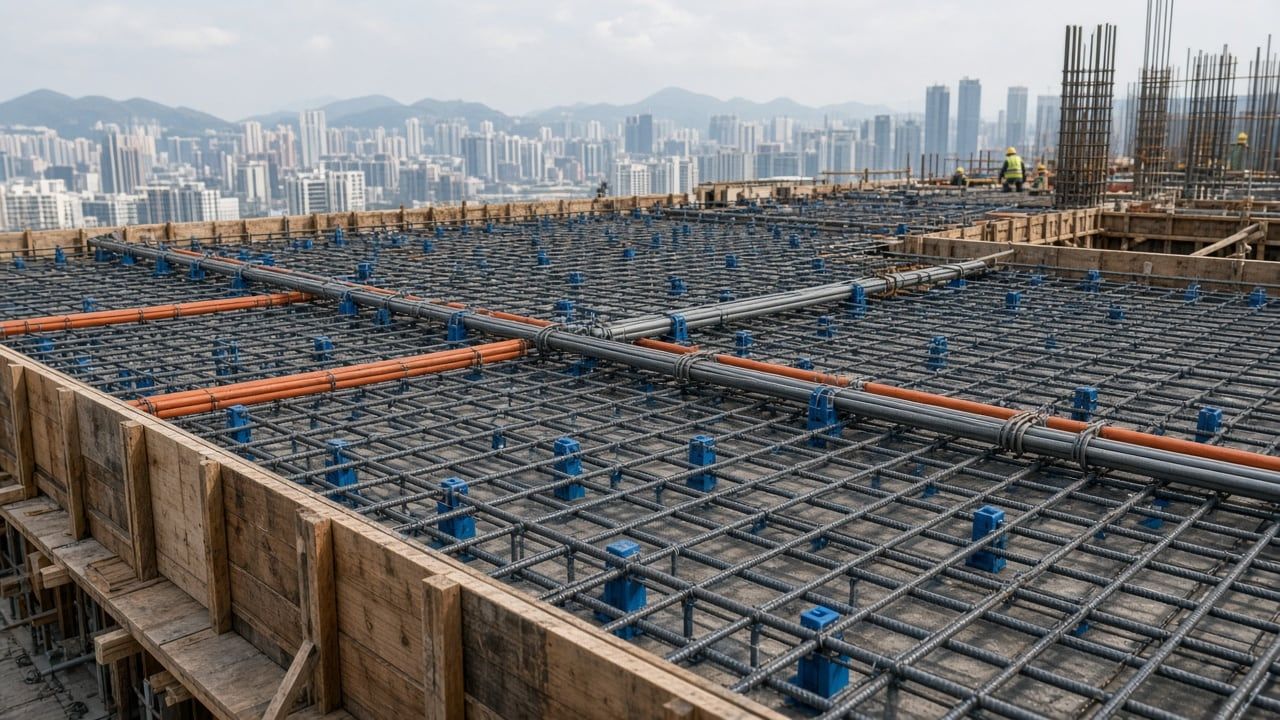
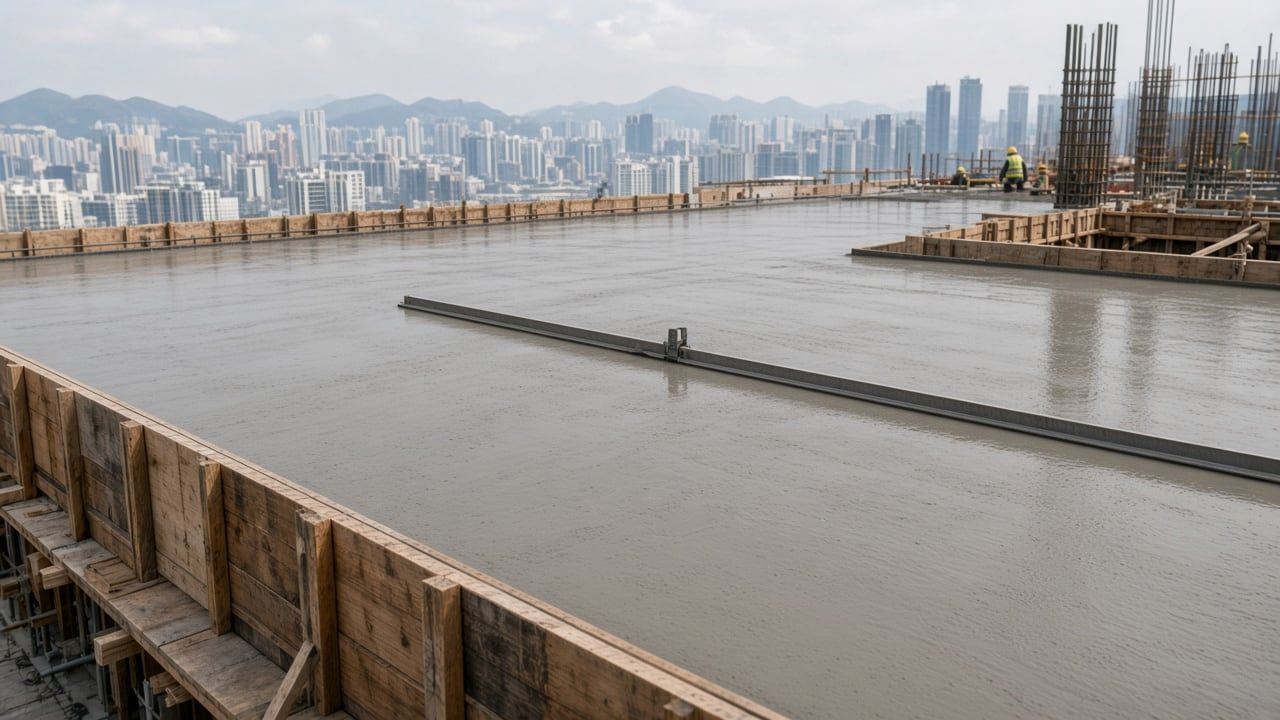
- Captured15 Oct 07:52
- Inspected15 Oct 10:20
- Covered16 Oct 12:00
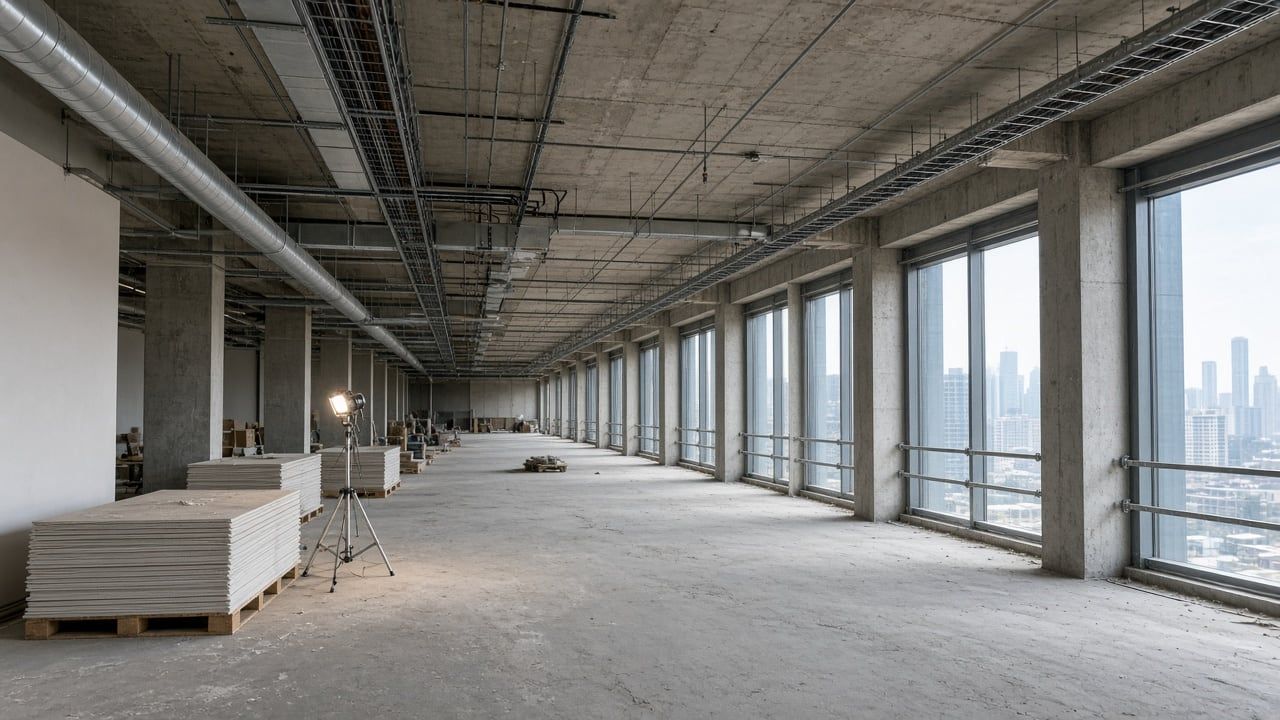
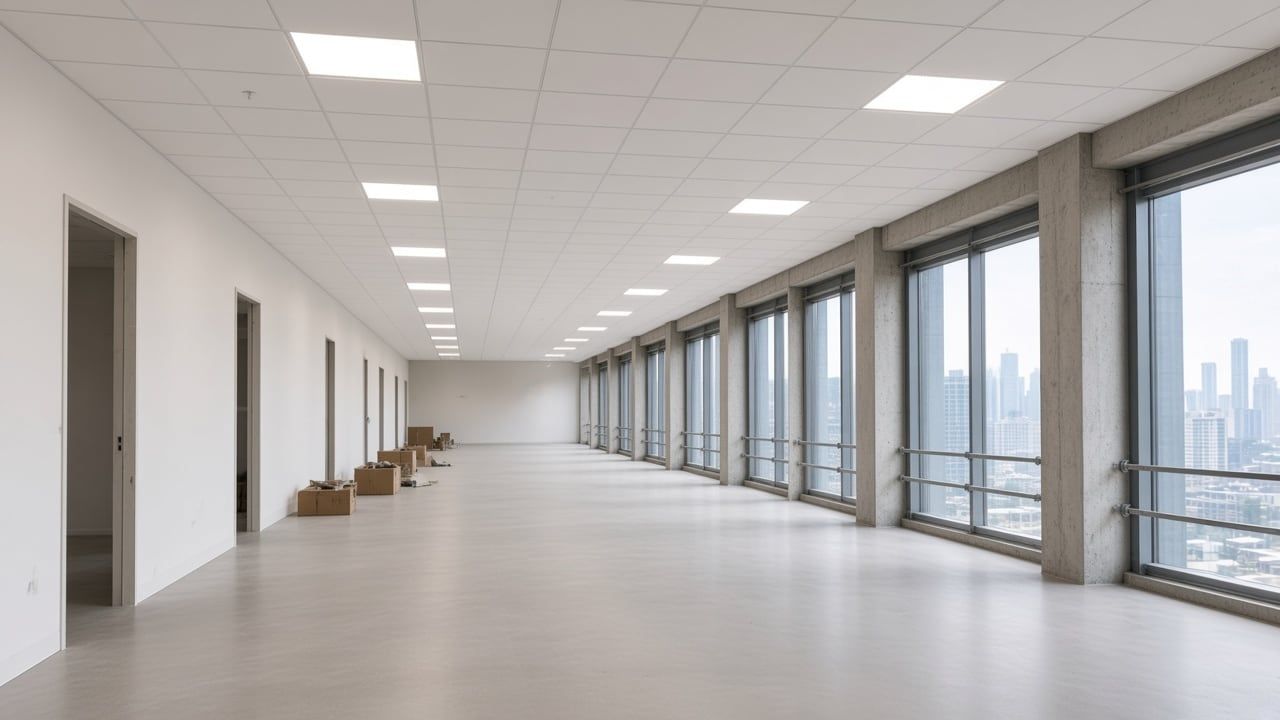
- Captured12 Aug 14:08
- Inspected13 Aug 09:40
- Covered7 Oct
Illustrative. The record is dated supporting evidence. It does not replace the contract's own procedures or the engineer's judgement.
What it changes for the project team.
Less arguing about the past, and less paying to find out what is behind the finish.
Fewer disputes and claims
A dated, located record settles what was on site and when, for extensions of time, variations and back-charges, before positions harden.
No opening up after cover
Hidden works are recorded before the pour or the ceiling. Nobody cores, breaks out or lifts boards to prove what is inside, which avoids the rework and the argument over who pays for it.
Fewer site visits
Project managers, consultants and clients check progress and evidence on screen, zone by zone. Walks are for decisions, not for finding out the status.
Slippage seen early
Zones behind programme turn red on the plan after each walk, while there is still time to re-sequence the work.
Built for the people who carry the risk.
Contractor project manager
Defend the claim
Show what was built and when. Answer delay claims and back-charges with dated photos from the same position, not with memory.
Client project manager
Check the payment claim
Set the interim valuation against what the plan shows was built, zone by zone, before you certify. The progress score is a visual aid, not a valuation.
Consultant and resident engineer
Supervise remotely
Review the inspection request with its photo and position on screen, and keep a dated record of what you checked before it was covered.
How the platform fits together
One dated record, from capture to report.
Capture
Walk with a 360 helmet camera, fly a drone, scan with handheld LiDAR or mount a ScanStation. Every capture is dated and placed on the floor plan.
Read
The AI tags the objects it finds, lines up the same positions on two dates and lists what changed.
Record
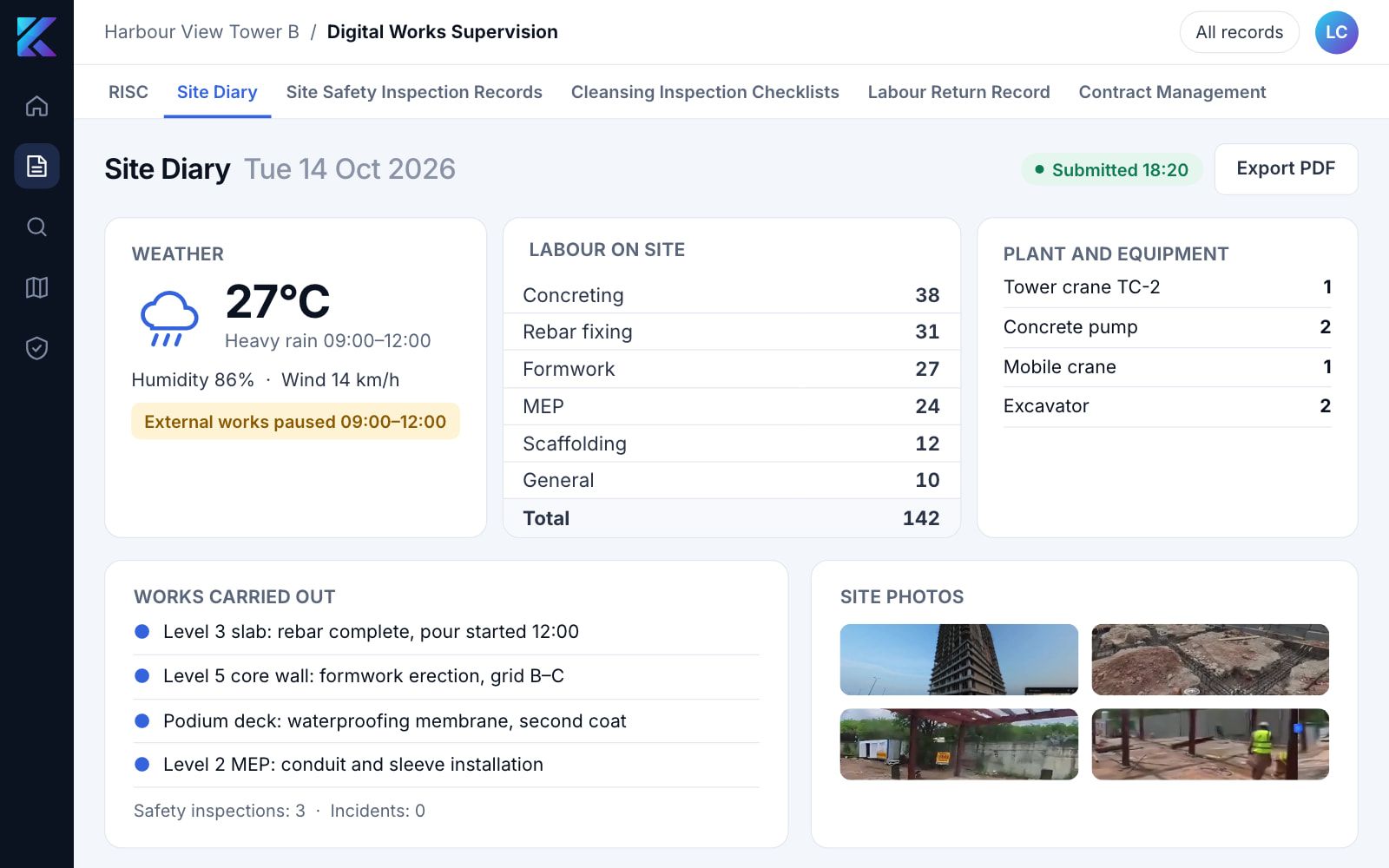
Findings, issues, inspections and the site diary live in one dated record, which in Hong Kong is also your DWSS.
Report
The AI drafts the progress and safety report for your experts to review, and you can ask the record questions in plain language.
Capture
Every capture lands on the floor plan.
Each capture is placed and dated as people walk, so the record builds itself. That placement is what lets the AI score each zone and line up the same position on two dates.
Read
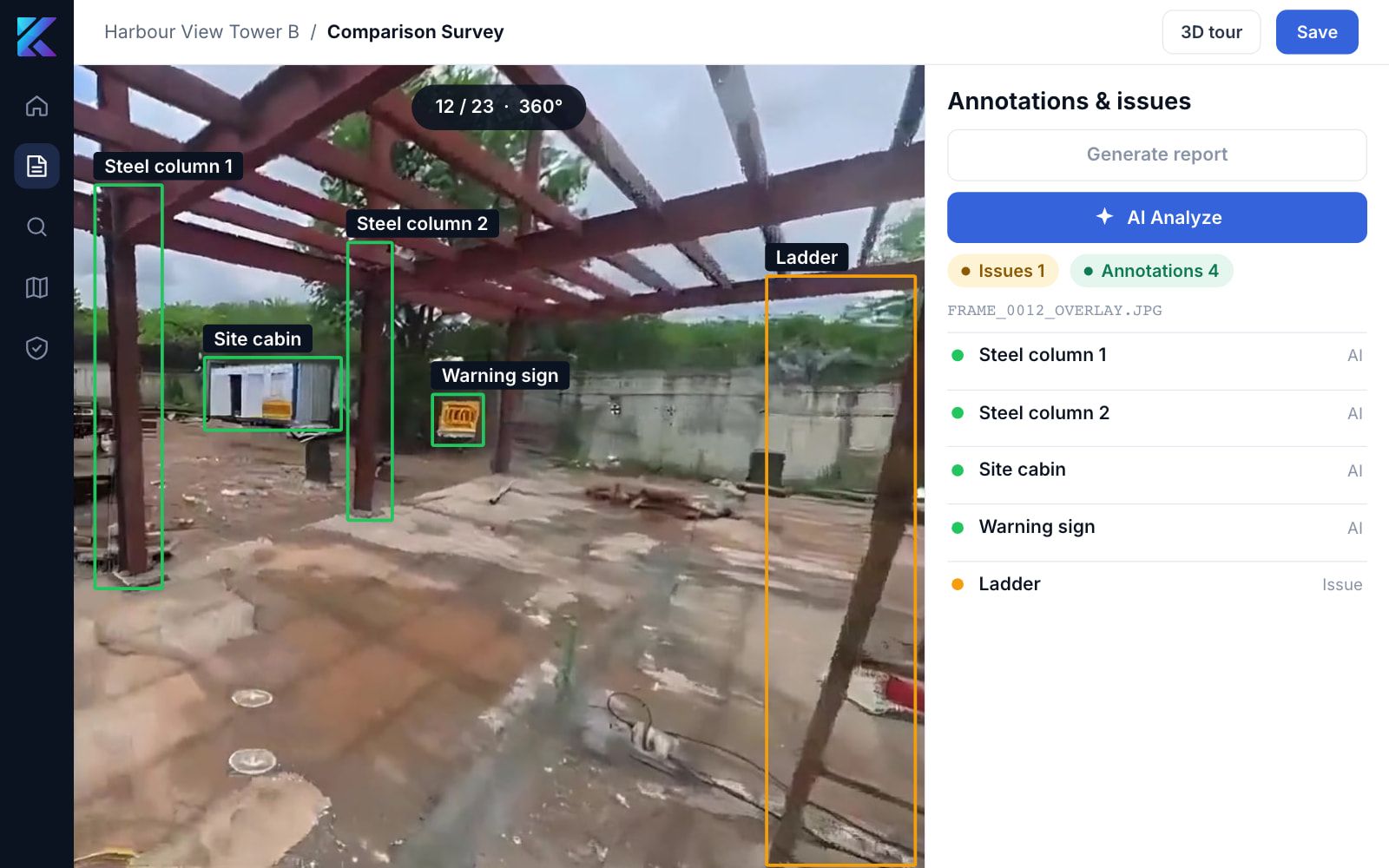
The AI tags what it sees.
AI Analyze finds the objects in each 360 frame and lists them in the annotations panel, ready to turn into issues.
Compare
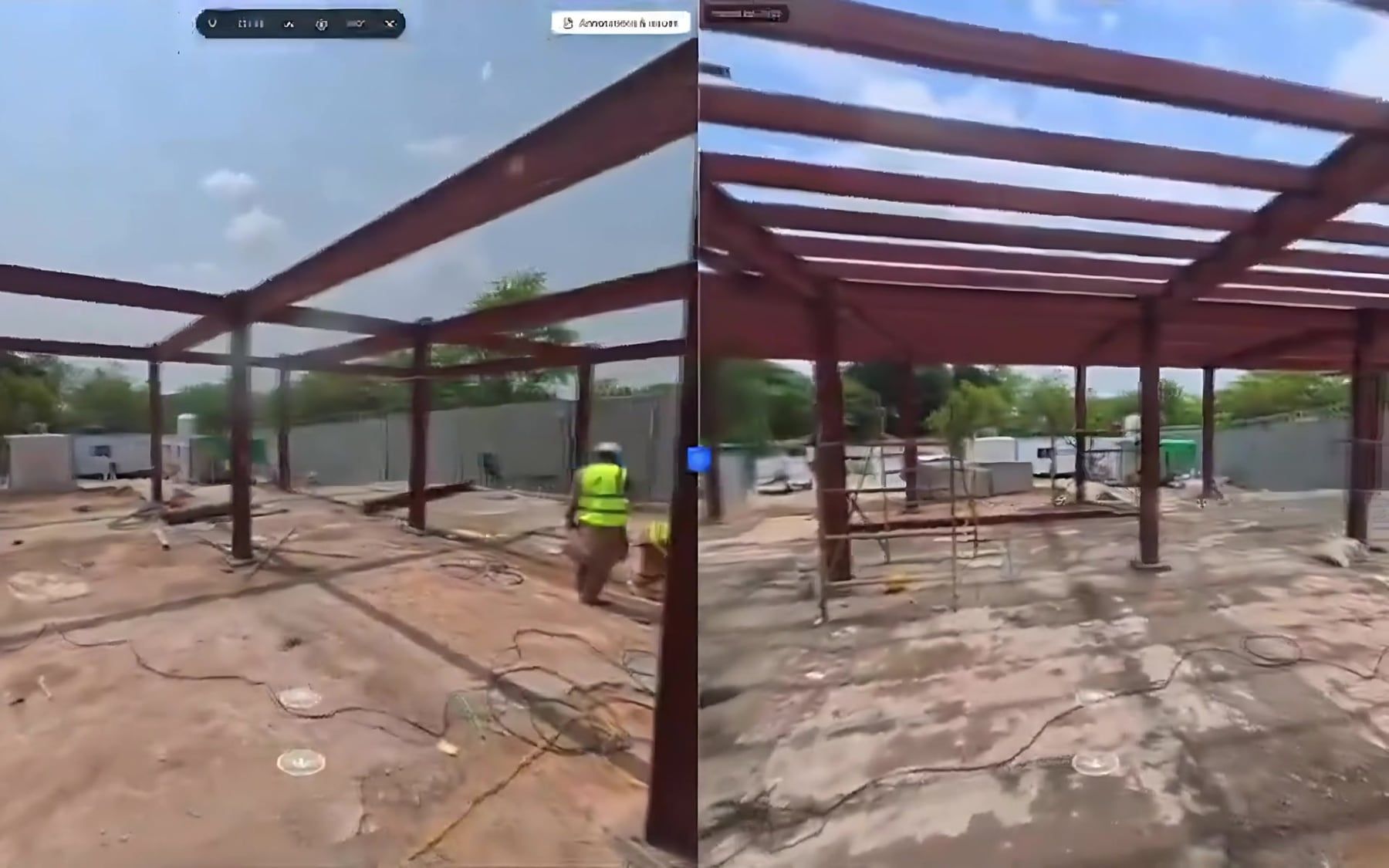
Two visits, side by side.
Open any two dates next to each other. The AI lines up the same position and lists what was built, moved or missed, so nobody needs another site walk to find out.
BIM
Check what is built against the model.
Lay the 360 capture next to the BIM view of the same space and spot where the two disagree.
Measure
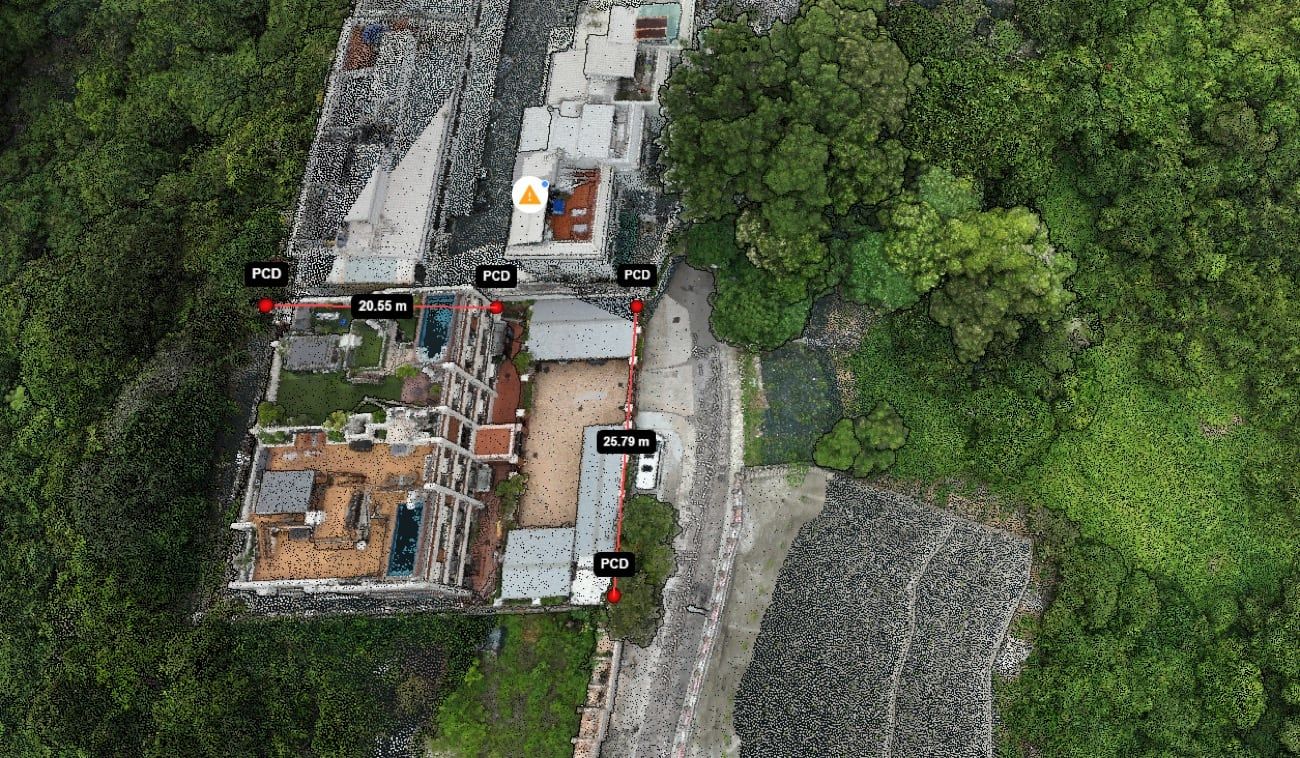
Take measurements off the point cloud.
Distances and areas straight from the scan, so nobody goes back to site with a tape.
Report
AI-drafted, expert-reviewed reports.
SpatialSense AI drafts the progress and change report from your walks, with the dated photo behind every finding. Your team reviews it and signs it off.
- Progress by zone on your floor plan, checked against the contractor programme.
- A change brief sorted into structure, plant, logistics and safety.
- Safety findings ranked by severity, with recommended actions.
- Every finding linked to the dated photo it came from.
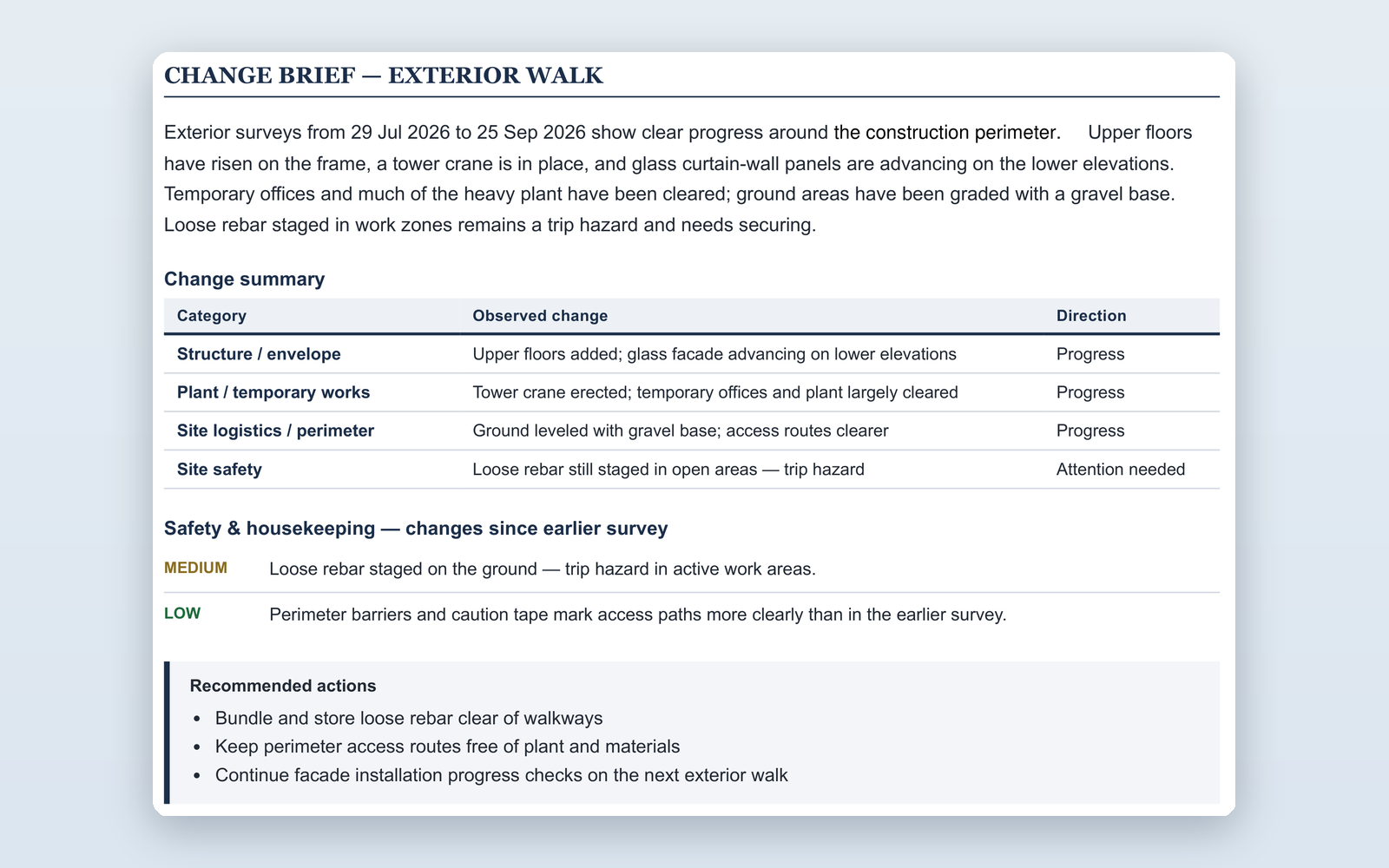
Part of a real report, with names removed. Progress scores are indicative visual assessments, not payment certifications.
Issues
Pin it in 3D. Assign it. Close it.
Pin an issue in the 360 view and assign it. Findings stay attached to the exact place and photo they came from, from the walk to the report.
Ask
Ask your site a question.
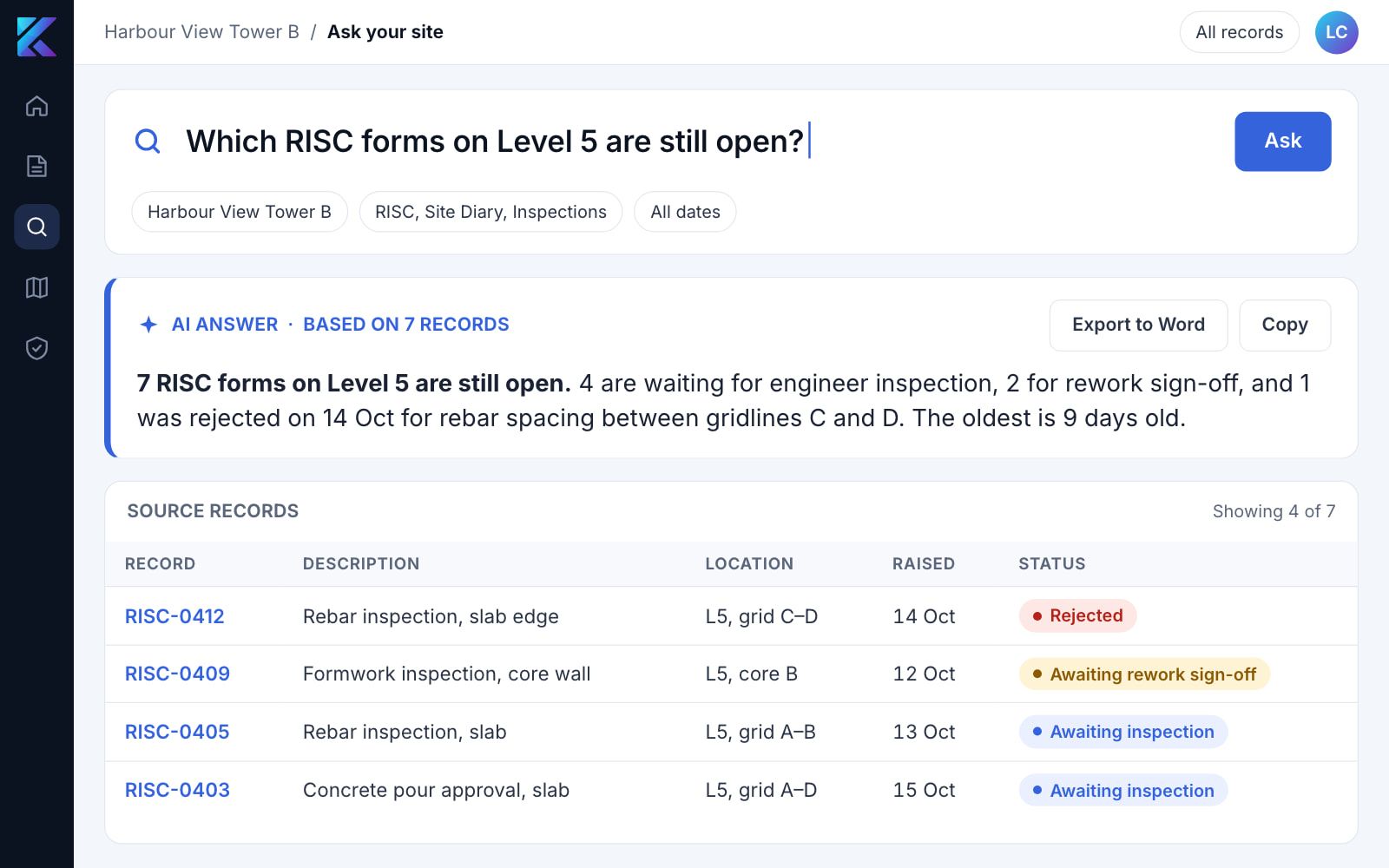
Search your site records in plain language and get a short summary with links to the source. Template reports export to Word.
Digital works supervision
A complete DWSS, ready for Hong Kong tenders.
SpatialSense is built to the DEVB Digital Works Supervision System circular, with all six mandatory workflow modules live: RISC, Site Diary, Site Safety Inspection Records, Cleansing Inspection Checklists, Labour Return Record and Contract Management.
Ready for the requirements on your contract.
Each solution page lists a requirement and shows which SpatialSense features meet it.
SpatialSense questions
Can the photos be used in a dispute or claim?
They are dated, located supporting evidence. Each capture carries its date, time, position on the floor plan and capture ID, and links to the inspection request that approved the works. How a record is used in a claim depends on the contract and on whoever decides it, and it does not replace the engineer's certificate or the contract's own procedures.
Which hidden works should we capture?
Anything that will be covered and costly to uncover, such as rebar and embedded conduits before a pour, MEP above ceilings and inside walls, waterproofing before the screed, buried services before backfill and formwork before it is closed. A 360 helmet walk through the zone is usually enough.
How is progress by zone worked out?
SpatialSense AI reads each zone from its dated captures and checks it against the floor plan and the programme. Your team reviews the result before it goes out, and the score stays an indicative visual assessment.
Who checks the AI's report?
SpatialSense AI drafts the report and your own team reviews it before it goes out. For a sample, a Kodifly engineer reviews the draft before it reaches you.
Is the AI's progress score certified?
No. Scores are indicative visual assessments of construction progress. They are not payment valuations or certified quantities.
How is SpatialSense priced?
Per site, with unlimited users, quoted per project. Tell us the site and what you need to show, and we will send a quote.
Is SpatialSense a complete DWSS on its own?
Yes. SpatialSense is built to meet the DWSS requirements in TC(W) No. 8/2025 without other Kodifly products.
Do I still need a separate EDMS in Hong Kong?
No. The circular states that the Smart Document Management component within the DWSS fulfils the EDMS requirement (paragraph 11).
How do I see it working?
Ask for a sample AI report from two of your site visits, or book a demo and tell us the site. We will walk through SpatialSense using your kind of project.
See what the AI makes of your site.
Send us two visits to the same site. We will return a sample report on what changed, how far each area has moved and what needs attention.