
Sample AI report
See what AI makes of your site
Send us two visits to the same site. SpatialSense AI compares them and drafts a report with % complete by zone on your floor plan, what changed and what needs attention, with the dated photo behind every finding. Our engineers review it before it reaches you.
What you get
Progress by zone, with the evidence behind it.
Your floor plan coloured by % complete for each zone, the change between the two dates, safety findings ranked by severity and recommended actions. Every finding links to the dated photo it came from.
- % complete by zone on your own floor plan, against the programme if you share it.
- What changed, sorted into structure, plant, logistics and safety.
- Safety findings ranked by severity, with actions.
- Dated photo evidence for every finding, from the same position on both dates.
Illustrative floor plan. Your sample uses your own site. Scores are indicative visual assessments, not certified quantities.
Evidence
A dated photo behind every change.
Each change in the report is shown as the same position on the two dates, so a missed partition or an unfinished ceiling is visible on the page and not argued later.
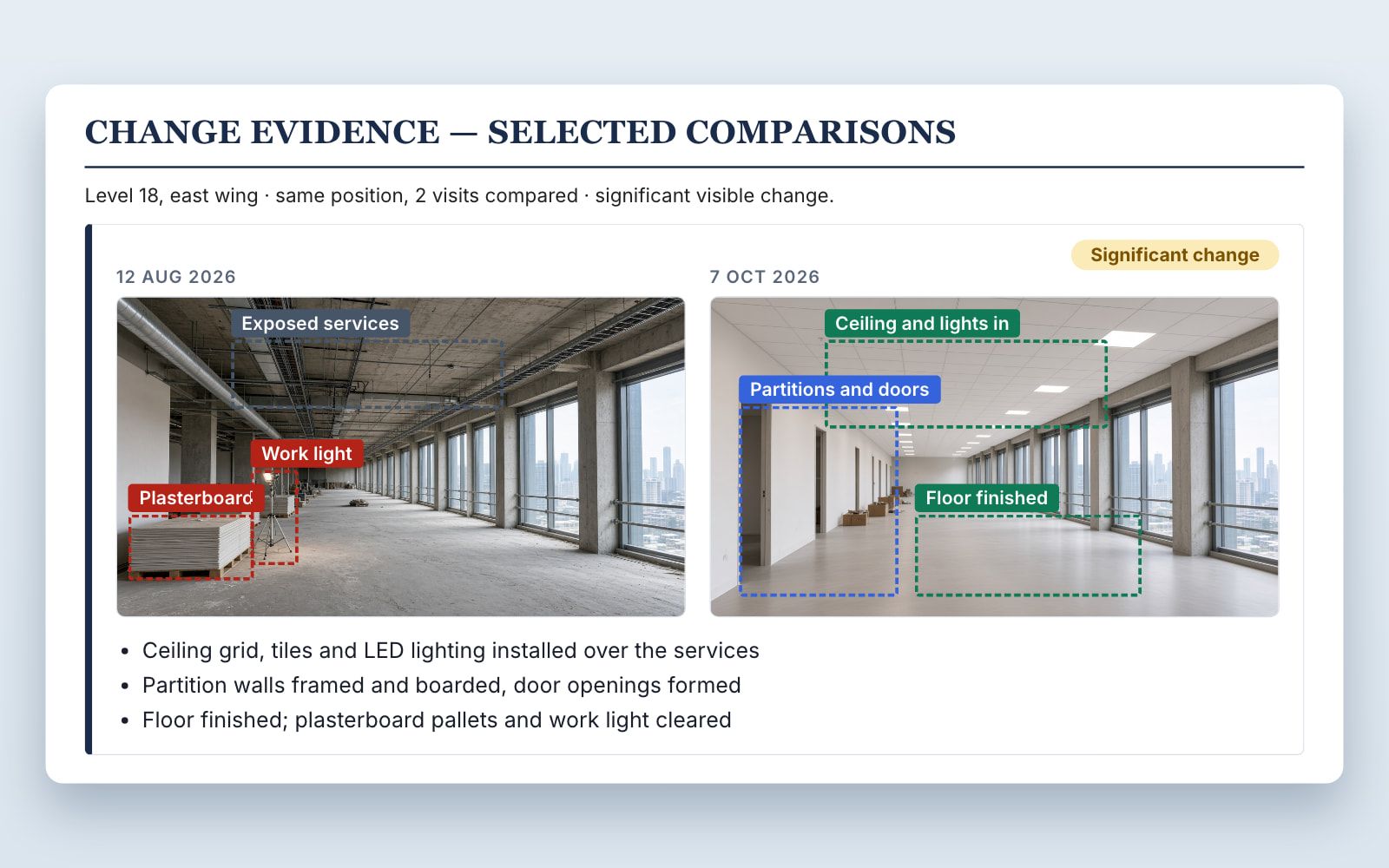
Illustrative change evidence page. Names and project details are removed from real reports.
How it works
Tell us about the site
Where it is, what you are building and what you need to show.
Share two visits
Two 360 walks, drone flights or sets of photos of the same positions, taken on different dates.
AI drafts the report
SpatialSense AI compares the two dates and drafts the change brief.
Engineers review and send
A Kodifly engineer checks the draft before it is sent to you.
Request your sample report
Tell us the site and how the two visits were captured. We reply by email, usually within one working day, with how to send them.
Sample report questions
What do I need to send?
Two visits to the same site on different dates. A 360 camera walk works best, because SpatialSense can line up the same positions. Drone flights or matching photos also work. Tell us what you have and we will say what is usable.
Who checks the report?
SpatialSense AI drafts it and a Kodifly engineer reviews it before it reaches you.
Can I use the report in a claim or dispute?
The photos are dated supporting evidence, each with its capture date and position. How they are used in a claim depends on your contract and on whoever decides it. The report does not replace the engineer's certificate.
Is the progress score certified?
No. Scores are indicative visual assessments of construction progress. They are not payment valuations or certified quantities.
What happens to my site data?
We use what you send to prepare your sample and to reply to you. The privacy policy explains how we handle the information.